UNIX Survival Guide
A website with curriculum for all levels of web developers learning to navigating a CLI.
I was the Project Lead, successfully coordinating all aspects, including site content, information architecture, graphic design, interaction design.
Skills
Wireframing, User Testing, Information Architecture, Design Document, Requirements Gathering, Competitive Analysis, Mobile Compatibility, WCAG 2.1, Style Guide, Team Work and Delegation Tools: Figma, GitHub, Visual Studio Code, Google Docs Languages: HTML, CSS, JS, PHP, SQL
Link to Project
https://www.figma.com/file/ybU4Kyda20lhD6FI40KKKW/Style-Guide?type=design&node-id=0%3A1&mode=design&t=K58gJCfCvsvSkSrh-1

Prompt and Solution
The project started with a problem statement and required a final site with full body copy, use of a databse, a way to test users proficiency. The project must demonstrate proficiency in web site design, planning and documentation as part of a team. The team made a Survival Guide for UNIX that educates about the creation and maintenance of web sites. The final design is an interactive quiz-based website. As this is an educational site, the site's educational content is provided in a linear manner and provides quizzes along the way to test comprehension. The purpose of the website is to increase interest and understanding of UNIX. I contributed to all aspects of the project and made sure that all deliverables were completed to a high standard before their deadlines. As team leader, it was my responsibility to arrange meetings, create agendas, and monitor team progress. I documented progress in a weekly progress report and ensured that benchmarks were completed on time.
Information Architecture
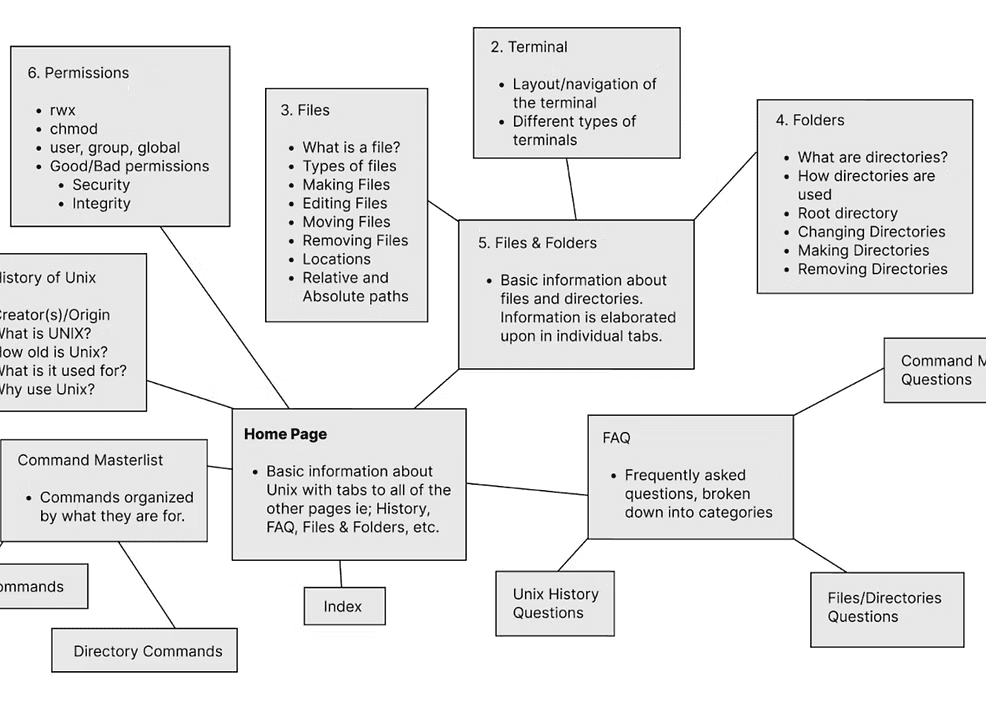
Knowing that the site must include multiple educational topics on navigating through a command line interface plus other resources like an FAQ page, I organized possible topics by the different elements you can interact with. Below is a bubble map of all the topics we wanted to include. There are six main bubbles that are connected to the homepage represent our nav bar links. Following a rule of keeping the nav bar simple, we kept the number of links in the nav bar under seven, so they are easy to remember. Pages that branch off of the main bubbles were cached underneath the main topics in dropdown menus; they are related but not important and large enough to merit their own nav link.
Style Guide
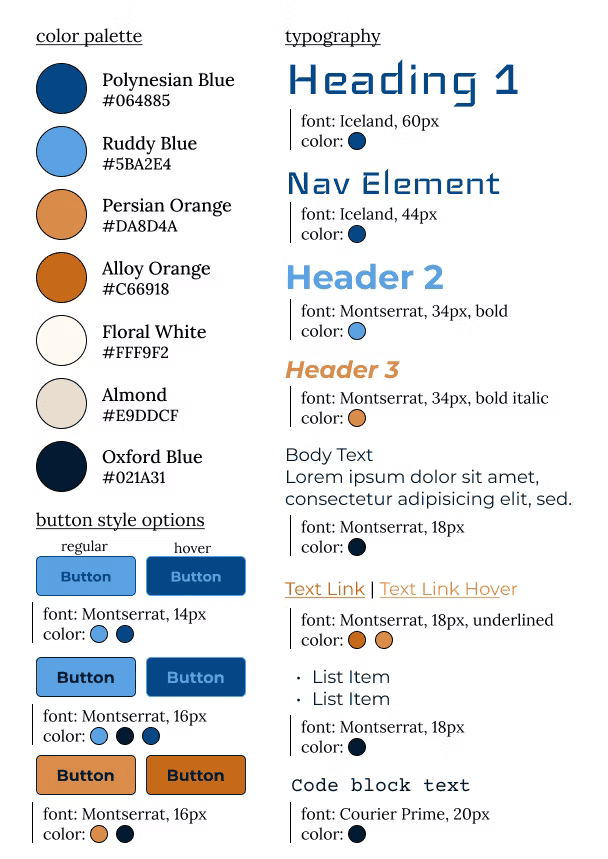
The color scheme was chosen such that it represented RIT with vibrant orange and a stereotypical nerdy, outer space-like color with a rich blue. The primary color is a floral white and is complemented by a dark almond white. The blue background images of code was used for inspiration in generating the color pallet. The typography pairing of Iceland and Montserrat was chosen for its simple, squarish, grid-like look. Iceland is reminiscent of a computer font. Montserrat is a multipurpose, sans-serif font that pairs well with the blocky look of Iceland. The logo was created using ascii art since this was a web development project. The team decided on the name "The Pina Koalas".
User Personas
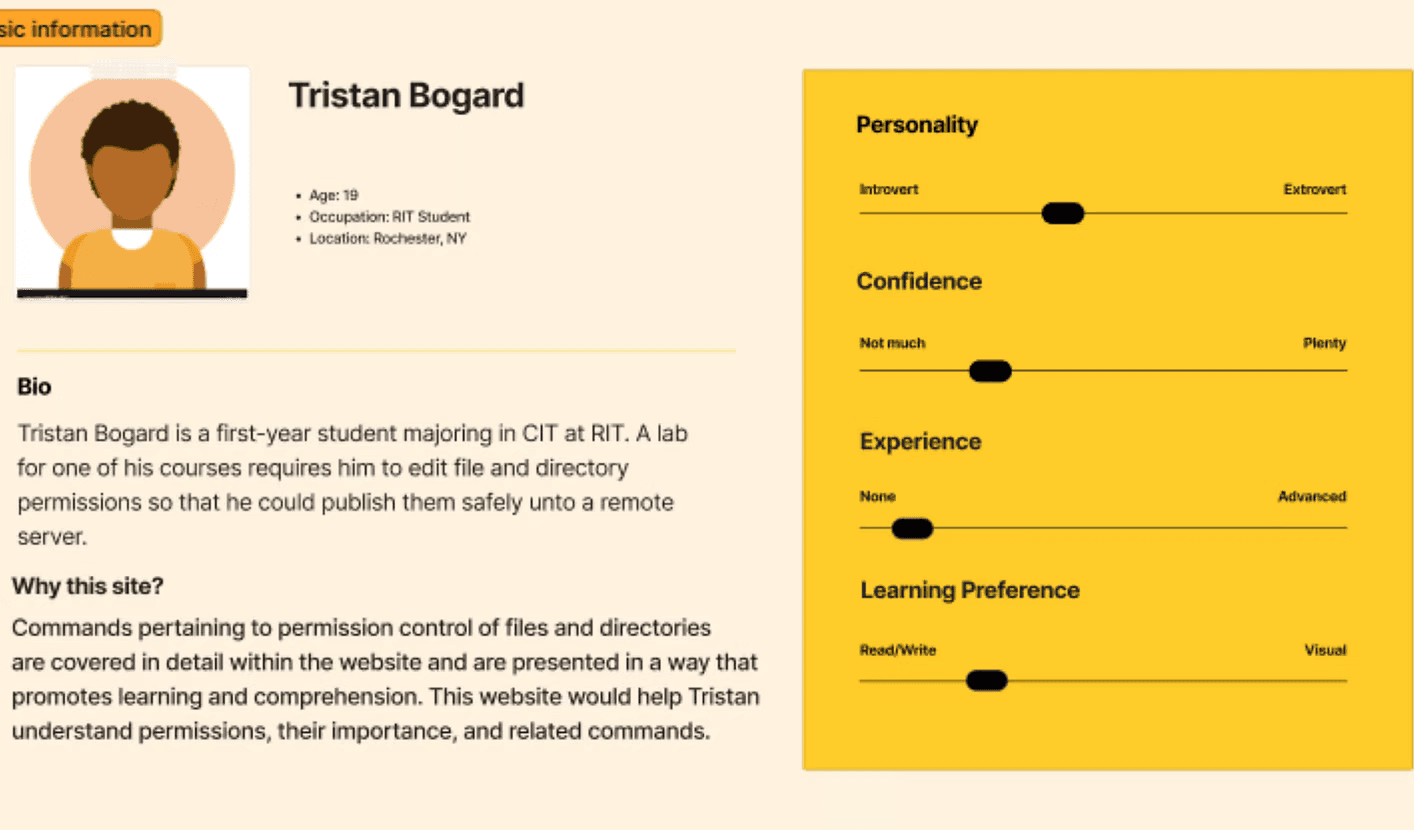
The user personas were created from user research. I spoke with the project sponsor (professor) and asked clarifying questions about who would use the end site. The project instructions were vague, stating that the website must be useful for freshmen who are new to coding and also useful for seniors who are very familiar with the CLI but may use the website as reference material from time to time.